
Sharing your protocols amplifies their impact. Whether you're sending a remedy to a specific client, sharing with a study group, or making your work available to the entire wellness community, Essential Protocols gives you flexible sharing options that match your needs.
Pro Feature
Understanding Sharing & Visibility
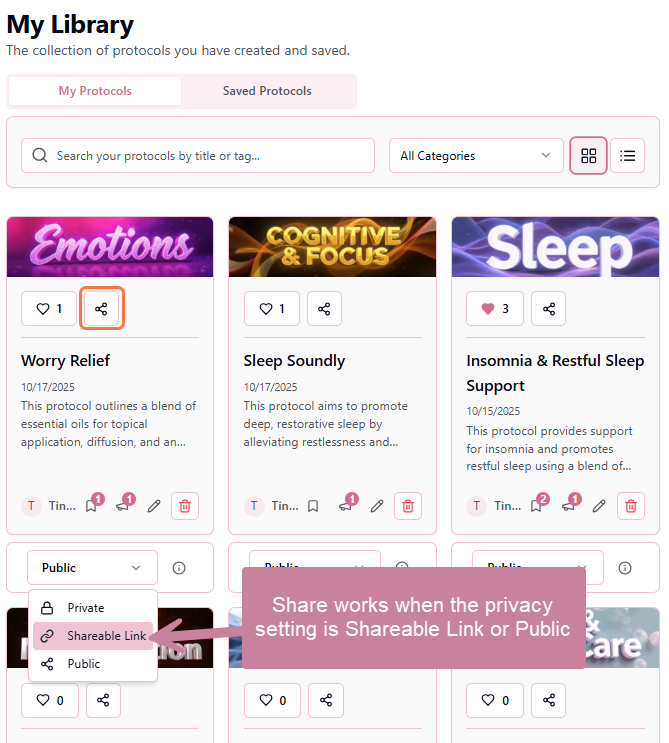
Before sharing a protocol, it's important to understand how visibility settings affect sharing:
Private Protocols
Cannot be shared. You must first change the visibility to "Shareable Link" or "Public" before sharing options become available.
Shareable Link Protocols
Share via direct link only. Anyone with the link can view, but the protocol won't appear in public searches. Perfect for controlled sharing.
Public Protocols
Share via link or let users discover naturally. Fully visible in searches and on the Discover page. Best for building your community presence.
How to Share a Protocol
- 1Ensure your protocol visibility is set to "Shareable Link" or "Public"
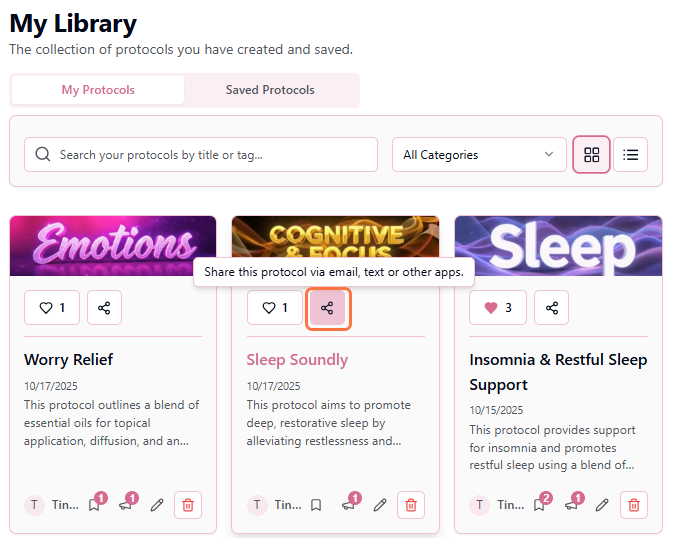
- 2Click the "Share" icon on the protocol card
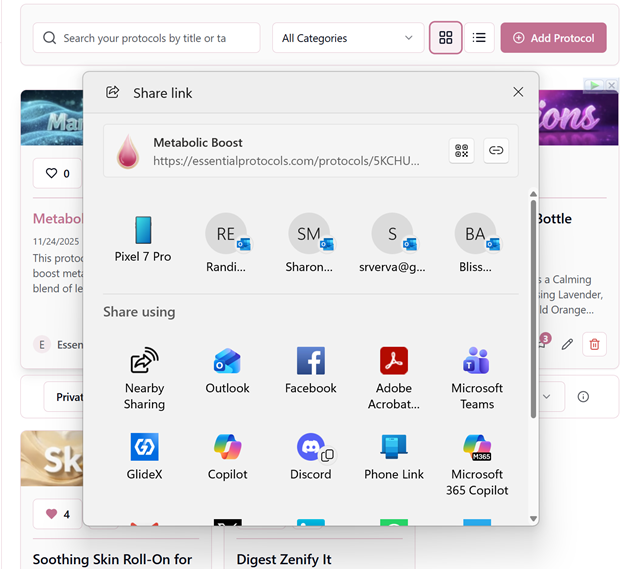
- 3Choose your preferred sharing method
Sharing Methods
Essential Protocols integrates with your device's native sharing capabilities, giving you multiple ways to distribute your protocol:
Copy Link
Copies the direct protocol URL to your clipboard. Paste it anywhere—emails, texts, documents, or messaging apps.
essentialprotocols.app/p/abc123
Opens your default email client with a pre-formatted message containing the protocol link and a brief description. Perfect for professional client communications.
Text/SMS
Opens your messaging app with the protocol link ready to send. Great for quick sharing with friends or wellness group members.
Social Media
Share directly to Facebook, Twitter, WhatsApp, or other installed social apps. Availability varies by device and installed applications.
Pro Tip
What Recipients See
When someone clicks your shared link:
They land on the protocol detail page
Full protocol information is immediately visible
They can read without logging in
The entire protocol is viewable immediately
Prompted to create free account
To save, like, or interact with the protocol
They see your author profile
Your name, photo, and other public protocols (if applicable)
Tracking Engagement
After sharing your protocol, you can monitor how it's performing:
- Likes: See how many users have liked your protocol
- Saves: Track how many people saved it to their library
- Testimonials: Read feedback and success stories from users
- Views: Monitor total protocol views (for Public protocols)
Best Practices for Sharing
📱 Choose the Right Method
Match your sharing method to your audience:
- Individual clients: Email with personal notes
- Study groups: Copy link and paste in group chat
- Social media: Use native sharing for public protocols
- Professional networks: Email or LinkedIn
✍️ Add Context
Don't just send a bare link! Add a sentence or two explaining why you're sharing this protocol, who it's best for, or what results you've seen. Context increases engagement and shows you care.
🔄 Follow Up
After sharing with clients, check back to see if they've left a testimonial or have questions. Engaged clients are more likely to try the protocol and report results!
🎯 Test Before Sharing Widely
Share new protocols with a small group first (using Shareable Link). Gather feedback, refine, then make Public for wider distribution. This ensures you're sharing your absolute best work.
Revoking Shared Links
Need to stop sharing a protocol? Simply change its visibility:
- Change from "Shareable Link" or "Public" to "Private"
- All previously shared links will stop working immediately
- Users who already saved it will keep their copy (but won't see updates)
Building Your Reputation Through Sharing
Every protocol you share is an opportunity to demonstrate your expertise and help others on their wellness journey. Wellness professionals who actively share quality protocols build trust, attract followers, and establish themselves as go-to resources in the community. Share generously, respond to testimonials, and watch your impact grow!