
Sometimes protocols you've saved disappear from public view—the author may have made them private, deleted them, or lost their Pro subscription. Understanding how removed protocols work helps you manage your library and know what to expect when protocols become unavailable.
Why Protocols Get Removed
Author Made It Private
The author changed visibility settings from Public to Private. The protocol still exists, but it's no longer publicly accessible.
Author Deleted the Protocol
The author permanently removed the protocol from Essential Protocols. This is irreversible and the content is gone from their account.
Author's Pro Subscription Ended
When an author's Pro subscription expires, all their public protocols automatically become private to comply with platform policies.
Account Deactivation
The author deleted their account or it was suspended for policy violations. All their protocols become unavailable.
What You See in Your Library
When a protocol you've saved is removed, it doesn't disappear completely from your Saved Protocols. Instead, you'll see:
Protocol Card Remains Visible
The protocol card stays in your Saved Protocols tab with the title and author name
"Removed by Author" Badge
A clear indicator shows the protocol is no longer available
Basic Info Preserved
You can still see the protocol title, category, and when you saved it
Content Unavailable
You cannot view the protocol details, ingredients, or instructions anymore
Viewing Removed Protocols
- 1Go to "My Library" from the main menu
- 2Select the "Saved Protocols" tab
- 3Removed protocols appear with a special "Removed by Author" indicator
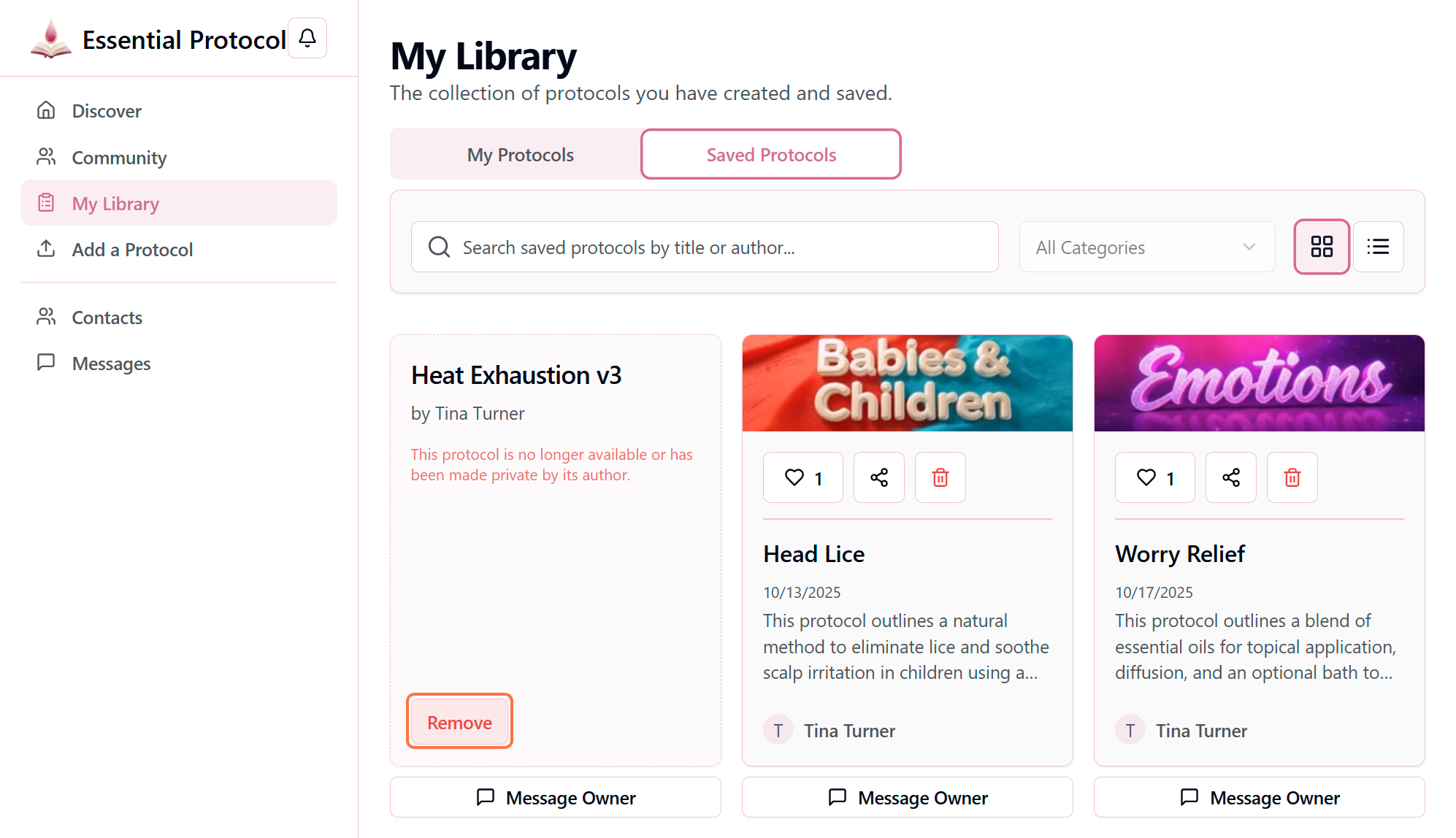
- 4Click the "Remove" button to delete it from your library.
Pro Tip
Preventing Loss of Important Protocols
✓ Best Practices
- Copy critical protocols to a personal document
- Take notes on protocols you use regularly
- Print or save PDFs of essential protocols
💡 Smart Strategy
- Diversify—save multiple protocols for each need
- Follow authors whose content you value
- Leave testimonials to encourage authors to keep protocols public
- Consider upgrading to Pro to create your own backup protocols
Create Your Own Versions (Pro Users)
If you're a Pro subscriber and find a protocol you absolutely love, consider creating your own version with your personal modifications. This ensures you'll always have access, plus you can share your improved version with the community!
Understanding Author Rights
Protocol authors have the right to:
- Change visibility settings at any time
- Delete their protocols permanently
- Make protocols private when their Pro subscription ends
- Control who can access their intellectual property
The Nature of Community Knowledge
Essential Protocols thrives on shared knowledge, but that knowledge flows through individual contributors who maintain control of their work. Removed protocols remind us that nothing digital is truly permanent, and the best way to preserve wellness knowledge is through personal practice, documentation, and community relationships. When you find protocols that transform your wellness journey, engage with the authors, learn the principles behind the recipes, and make the knowledge truly yours through understanding and application—not just saved bookmarks.