
You can cancel your Essential Pro subscription at any time with no penalties or fees. When you cancel, you'll retain access to all Pro features until the end of your current billing period.
Canceling Through Stripe Portal
The easiest way to cancel is through Stripe's customer portal, which gives you full control over your subscription.
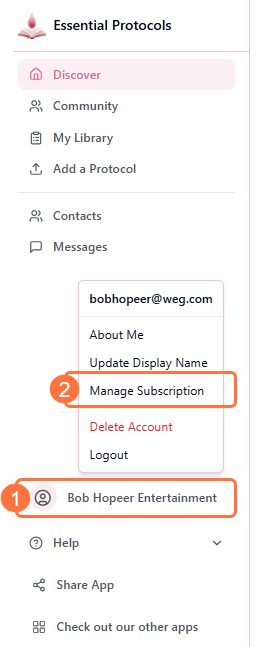
- 1Click on your user menu
- 2Select "Manage Subscription" from the dropdown menu
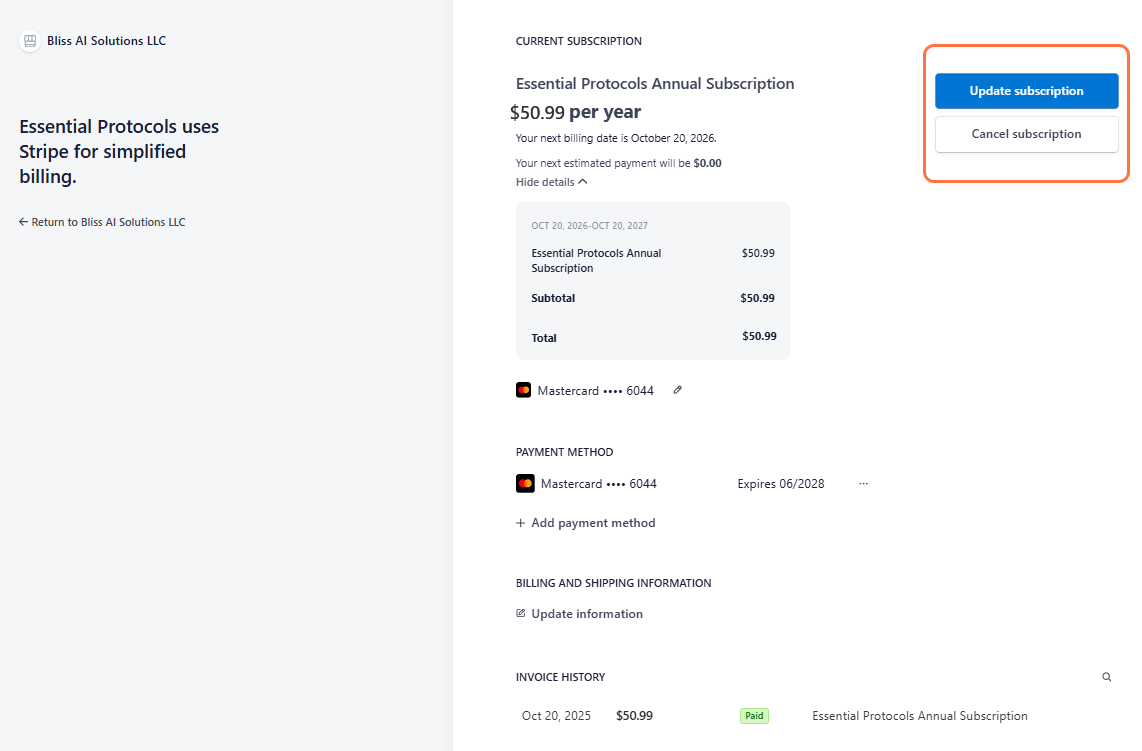
- 3You'll be redirected to the Stripe customer portal
- 4Click the "Cancel subscription" button in your subscription details
- 5Stripe will ask you to confirm the cancellation
- 6Click "Cancel subscription" again to confirm
- 7You'll see a confirmation that your subscription has been cancelled
Immediate Confirmation
You'll receive a confirmation email from Stripe once your cancellation is processed. The email will include your subscription end date.
What Happens When You Cancel?
Understanding the cancellation process helps you plan accordingly:
Immediate Effects
- • Your subscription is marked as "canceled" in the system
- • You will NOT be charged for the next billing period
- • Your cancellation date is recorded
During the Remaining Period
- • You retain FULL access to all Pro features until your subscription ends
- • You can continue creating and editing protocols
- • You can still message other Pro members
- • You can participate in community discussions
After Subscription Ends
- • Your account reverts to Free tier
- • You can no longer create new protocols or edit existing ones
- • Your public protocols are automatically set to private
- • You can no longer send messages or start new discussions
- • You retain read-only access to protocols and community
- • Your saved protocols remain in your library
Your Protocols After Cancellation
When your Pro subscription ends, all protocols you created will automatically be set to private. They won't be deleted, but they'll no longer be visible to other users. You can still view them in your library, but you won't be able to edit them unless you re-subscribe.
Changing Your Mind?
If you cancelled by mistake or changed your mind:
- • Before the end date: You can reactivate your subscription in the Stripe portal by clicking "Reactivate subscription"
- • After the end date: You'll need to re-subscribe by going through the checkout process again
Alternative: Updating Your Payment Method
If you're considering cancellation due to a payment issue, you might want to update your payment method instead. Learn more about updating payment information.
No Hidden Fees
There are no cancellation fees, and you won't lose any data. You can always re-subscribe later and pick up right where you left off!